Your agent says it’s done. See for yourself.
Claude Code, Cursor and any MCP agent hand their work back on the task itself — every changed screen in every state, every changed API response, field by field. You approve or request changes on each one, and the agent picks up your notes in its next session.
Free plan available · one MCP URL, one API key · any web stack

Agents write code faster than you can check it.
The bottleneck moved. Writing the change takes minutes; finding out whether it’s right still means checking out the branch, clicking through every state and pasting notes back into a chat.
A diff doesn’t show the screen
Six hundred changed lines tell you nothing about how the empty state looks on a phone in dark mode.
Chat forgets your review
Notes pasted into one agent session are gone in the next, and nobody else on the team ever sees them.
“Tests pass” isn’t proof
You want to see the page and the response yourself, not take the agent’s summary on trust.
Your code goes to GitHub. Everything about the work goes to Damper.
Your agent runs next to your code and pushes it to your git host as usual. Damper holds the other half: why the task exists, what “done” has to prove, the evidence the agent brings back, and what you thought of it.
Claude Code, Cursor, Codex or any MCP client, working in your repository.
start_taskadd_screenshotlist_review_artifacts- The customer requests and votes behind it
- Spec, project rules and the completion checklist
- Evidence: every screen state and API response
- Your verdict on each one
PM, designer, founder or engineer. Nothing to check out or run.
Code review and CI stay where they are. The pull request is linked on the task.
Step by step
Your agent starts with the task, the rules and what you expect to see.
Starting a task locks it to one agent and returns the spec, the project rules for the files it’s about to touch, and your review evidence policy — which screens to capture, in which themes, viewports and states, and whether API examples are required.
- The highest-demand task first — ranked by what customers asked for and pay.
- No surprises at review time — the agent knows up front what proof you’ll ask for.

It captures every changed screen, in every state that matters.
As it works, the agent attaches screenshots of each changed page — empty, loading, error, filled — per theme, viewport and locale, with a before image when the page already existed. They land on the task, grouped by page, in the order the agent captured them.
- Before and after — side by side, so a regression is obvious at a glance.
- Variants filtered for you — only dark mode, only mobile, only one locale.
- Images go straight to storage through a one-time upload link, never through the agent’s context window.
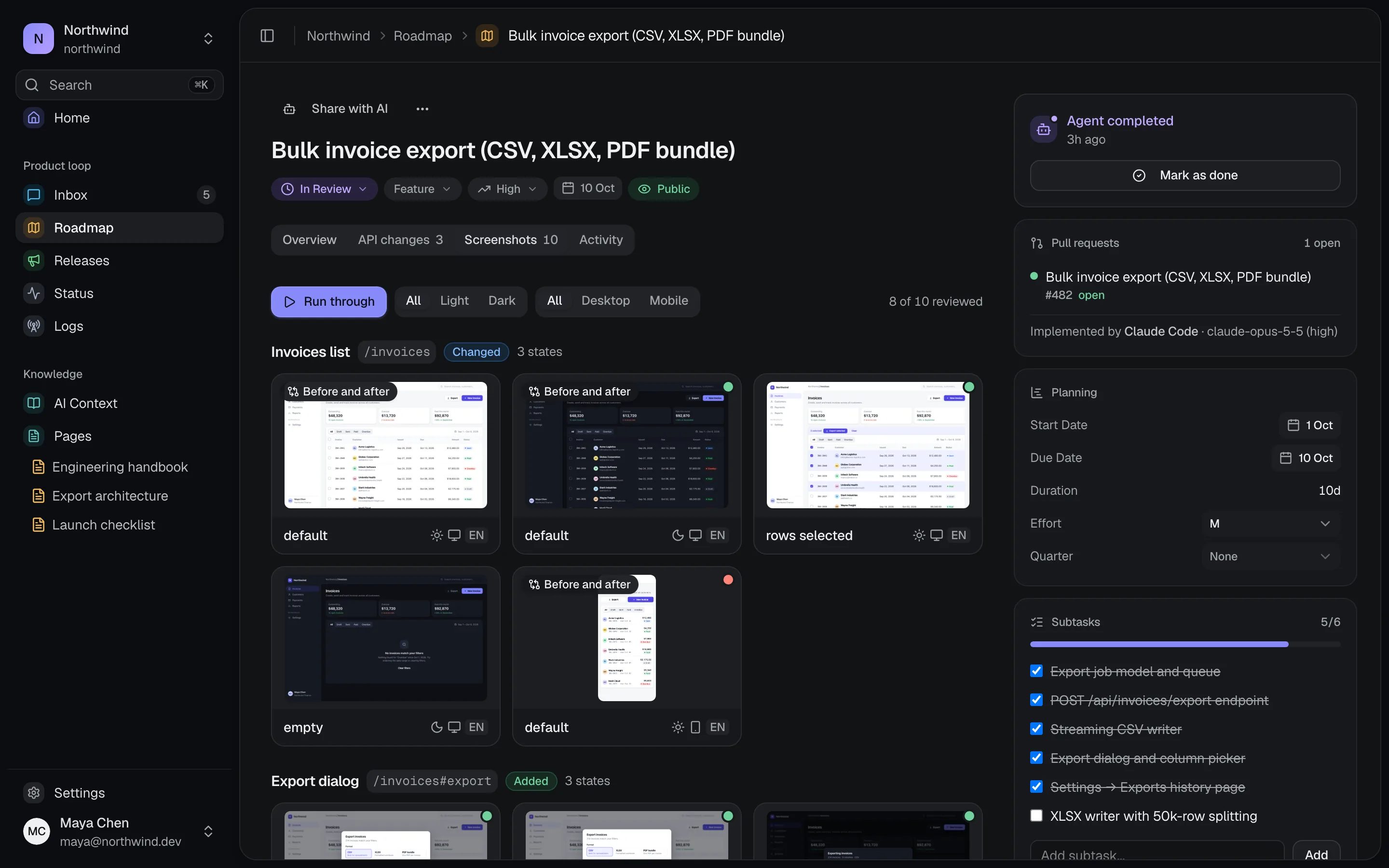
Review what it looks like, not just the diff.
Tasks waiting for you show up in Needs you on your home screen. Open one and run through every capture: approve it, or request changes with a note — one sentence is enough. Each verdict moves you to the next capture.
- Run through — every state in order, before and after side by side.
- One verdict per artifact — approve, request changes with a comment, or reset.
- Your whole team sees the same review, not just whoever was in the chat.

API changes, field by field.
For every added or changed endpoint the agent attaches the request, the response and what the endpoint returned before. Damper lists exactly which fields were added, changed or removed, so you never compare two JSON bodies by eye.
- One example per outcome — the success and each error case of a route side by side.
- Copy any example as curl and replay it against your own environment.
- Credential headers are redacted and long bodies trimmed before anything is stored.

The agent reads your verdicts and fixes exactly what you flagged.
Your verdicts are stored on the task, not in a chat log. In the next session, the agent lists the task’s artifacts, sees which ones you sent back and why, and redoes only those. A re-sent capture goes back to pending, so you only look at what changed.
- Works across sessions, machines and agents — the review lives with the task.
- Nothing to copy and paste — “changes requested” plus your note is the instruction.
Done means proven, with a receipt to show for it.
Completing a task needs evidence for every item on the project checklist, and Damper checks the declared change kinds against what was attached — API changes call for API examples, UI changes for screenshots. The task moves to review with a completion receipt: what shipped, what was verified and what risk remains.
- Missing evidence is flagged on the task — or blocks completion if you require it.
- When evidence genuinely doesn’t apply, the agent has to say why, and you see the reason.
- Ship it and the changelog drafts itself from the tasks that went out.

Not another code review tool.
Pull request review asks whether the code is right. Damper asks whether the result is — and makes sure the agent hears the answer. Most teams need both, and they work side by side.
Keep your pull requests. The PR is linked on the task, so code review and product review point at each other.
Decide once what proof you need.
Set it per project and every agent gets the same instructions at the start of every task — including the locale, theme, viewports and states to capture.

Two minutes to connect. Nothing to install in your app.
Damper is a hosted MCP server, a CLI and a plain HTTP API. Use whichever fits how your agent already works.
MCP server
One URL and one key for Claude Code, Cursor or any MCP client. The agent gets tasks, context and the review tools.
# Claude Code
claude mcp add --transport http damper \
  https://api.usedamper.com/mcp \
  --header "Authorization: Bearer dmp_..."
CLI upload
Point it at a folder of screenshots — file names become page and state — or a manifest with before images and API examples.
# invoices-list--empty.png → page + state
damper artifacts upload --task 42 \
  --viewport mobile --theme dark \
./screenshotsHTTP API
Scripts, CI jobs and agents without MCP use the same endpoints with a project API key.
# under /api/agent
POST tasks/:id/artifacts/screenshots
POST tasks/:id/artifacts/api-examples
GET  tasks/:id/artifacts
PUT  artifact-uploads/:token
Private by default
Screenshots and API examples are internal to your team and never appear on your public roadmap.
Secrets stay out
Authorization, cookie and API key headers are redacted before an example is stored, and agents are told to capture test data only.
Your code stays in your repo
Damper never clones or reads your repository. It only stores what your agent sends: task updates, PR links, screenshots and API examples.
Your stack, your tools
Damper doesn’t run your app. Capture with Playwright, your test runner or anything that writes a PNG.
Before you connect your agent
Which agents work with Damper?
How does the agent take the screenshots?
Do approvals block the task from shipping?
What happens when the agent re-sends a screenshot?
Is there a limit?
Does this replace GitHub pull requests or code review?
Does Damper get access to our source code?
Does Damper do anything besides review?
Stop reviewing your agent’s work in a chat window.
Connect Damper, hand your agent the top task, and check every screen and every response before it ships.